
Folders or in the language of the software engineers, directories, help to organize the files on the hard disk. One project is normally a folder with many files and sub-folders. You might have an active project version, a backup copy, or a copy from your colleague.
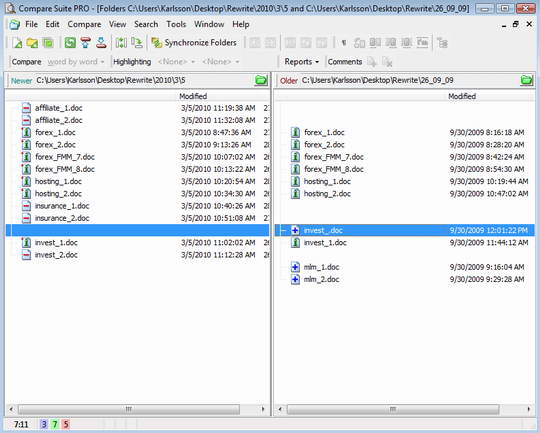
The point is that as in the case with individual files, with folders you can face a situation when you have two folders and you need to compare them against each other to see if they are equal files or files that were modified.
Most likely you won’t stop at this, you will need to synchronize s folder’s content or remove duplicates. For example, by taking the freshest versions of the files. Let’s review how Compare Suite can help.
Folder comparison
You have several options to start the comparison of two folders:
- Drag & drop two folders into the Compare Suite window
- Select two folders on your desktop, right click onto them and select the “Compare with Compare Suite…” command
- Start Compare Suite and select the “New folder comparison” command from “File” menu
Adjust folder comparison options
Go to the Tools > Options > “Folder comparison” to review the options available for folder comparison:
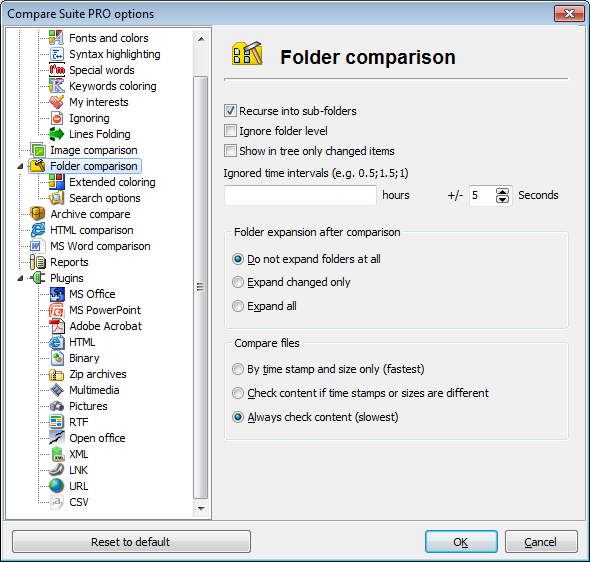
- Recuse into sub-folders. Let’s say you have the folder “Project” and inside you have “Resource 1,” “Resource 2,” … by checking “Recuse into sub-folders” you tell the program to scan not only the folder that you pointed to, but also can scan sub folders.
- Ignore folder level. Sometimes files are more important than their location. If you enable this option, then Compare Suite will search for files and will not take into an account their location. For example “test.txt” will be from the folder on the left and it will be compared with “test.txt” from the folder on the right. And it doesn’t matter that “test.txt” on the left is in “Resources” folder and “test.txt” on the right is in “Res” folder.
- Show in three only changed items. A folder might include hundred files, and reviewing all of them is not necessary, especially if they were not modified. If this is the case check this option and Compare Suite will show only changed folders and files.
- Ignore time intervals. You might have a copy of your project uploaded to the FTP server and then downloaded again to your local computer. In this and similar cases you might see that the only difference between files on your local disk and files from the backup copy is the creation date. This happens as some systems, such as FTP server, might update dates. As a result a compare program shows all files as different (as they have a different creation date). A solution to this problem is using this option. For example, you might enter here the value 5 hours (time difference between FTP server and local computer), and Compare Suite will not mark these files as different ones.
- Folder expansion after comparison. This option will expand the whole directory structure after the comparison or will expand changed files only.
- Compare files. How do you want Compare Suite to compare two folders? The fastest scan is when the program only checks file sizes and creation dates, but sometimes it is not enough. If you want to be sure that you have not skipped anything important, use “Always check content” options.
What file types are you interested in?
Do you want Compare Suite to search the differences within all files, or just scan files of certain type? For example, you might want to exclude some large files like .exe or .dll, which are not important for your comparison today.
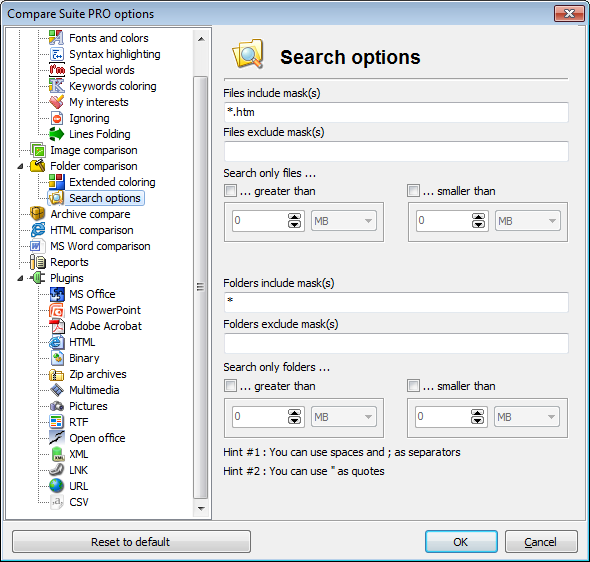
Go to the Tools > Options > “Search options.” There you will find several useful settings:
- Files include and exclude masks. For example, you might add .exe into exclude mask.
- File size filter. For example, you can scan only files between 1 MB and 5 MB.
- Folder include and exclude masks. For example, you might want to scan only folders with “Important” in their names.
- Folder size folder. You might want to exclude from the search folders bigger or smaller of a certain size.
Most likely you will find the answers that you are looking for after the comparison. The next thing you might need is to synchronize two folders.
Synchronize folders
Let’s assume that two folders contain different files. One contains a newer version of a.txt and another has a new version of b.txt. Our goal is to update one of the folders so that it contains the latest modifications of all files.
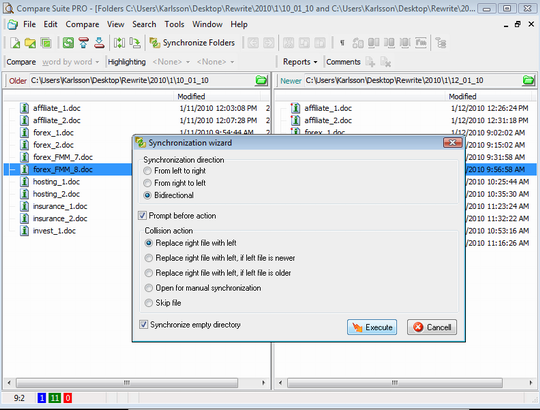
Click “Synchronize folders” button on the toolbar to start the “Synchronization wizard”
- Synchronization direction. First, you need to decide about the synchronization direction. E.g. if you want new files from the left folder to appear in the right folder, or vise-versa. You might want to choose “bidirectional,” in this case so both folders will be updated with the newest versions of files.
- Prompt before action. Such synchronization might be tricky, and you might want to review copy/deletion operations before they are applied. In this case check this checkbox.
- Collision action. Collision is when you have files on the left and on the right, and the program needs to decide which version to use. You can tell program to use files from the left (or right) folder, or use files from the left (or right) folder, but only if they are newer; or you can ask program to stop and open this two files for manual review. Finally, the program can simply skip these files.
- Synchronize empty directory. What if you have an empty folder? Check this check box, if you want the program to reproduce the folder structure as it is, even if the folder is empty.
Try these functions and you’ll see how easy the synchronization is. Well, actually you can do it automatically.
Command line
Compare Suite supports command line interface, you can use it including for folder synchronization. Managing with the parameters might be a tough task, that’s why there is “Integration wizard” that will help with all the parameters. Read more about using the command line interface.
Compare FTP directories
There is a typical case when you need to compare a local folder with an FTP directory, or compare two FTP directories. Compare Suite can manage with this as well.
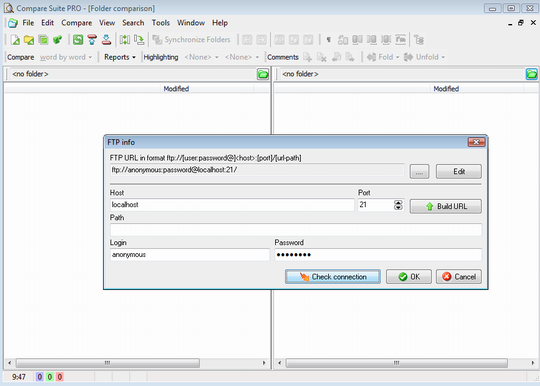
- Select File > Open from FTP…, then select the source directory for the left and/or for the right panel.
Folder comparison reports
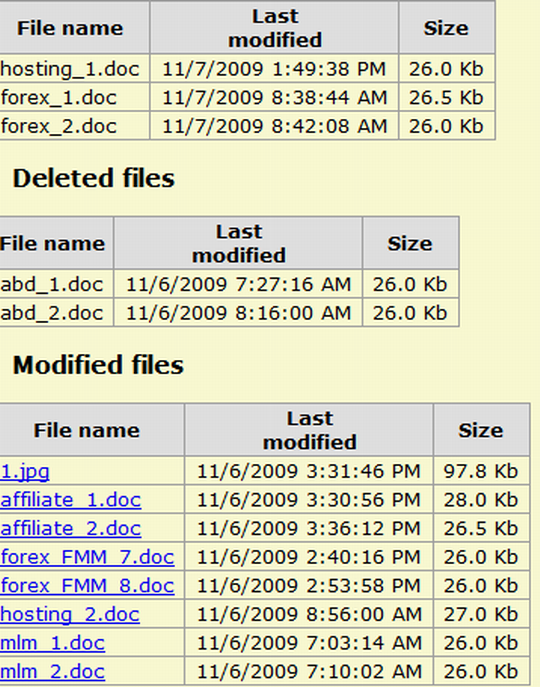
Do you need a report that you can share with your colleague? Compare Suite can generate detailed reports or a short summary about folder comparison. Check out Report option in File menu. Learn more about reports in Compare Suite.
Users about folder comparison
Here what our users tell about folder comparison:
We all know that duplication of files is nothing but trouble, and can cause enormous losses in corporate profits, and credibility. Read more…
Robert Sweet., Lamplight., Menomonee Falls, WI. Designer/CAD Admin.
The Product is very helpful in easily finding differences or making comparison to files and folders. Read more…
Polo Crispo E. Romagos ., Accenture, Manadluyong City. Software Engineer
I’m using Compare Suite to compare XMLs, codes, text files, documents, folders, compressed files and folders and create html reports. Read more…
Polo Romagos III, Accenture, Manila. Software Engineer.
Have you tried folder comparison with Compare Suite? Was it for synchronizing with the backup or for some other purpose? Feel free to share your experience in the comments.



















 Compare documents to find differences regardless of the format:
 Use the
  Archive comparison:
  Compare


 Compare files
 UNICODE is fully supported: open and compare documents in any language or encoding.
 Create a fully customizable

Leave a Reply
You must be logged in to post a comment.