
Selecting comparison method
Run Compare Suite. First you should select appropriate comparison method.
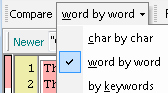
More information about comparison methods.
Running
Follow tree easy steps to compare two files.
1) Select "New File Comparison" command in "File" menu
2) Specify files to compare on both - left and right panel.

You should click Open button (see above) and select necessary file
3) Click Compare Button  to run comparison.
Comparison
Compare Suite analyzes file and file structure and highlights modification.
Compare Suite uses some specific color scheme for file comparison. More details about color scheme.
Please note, that we created navigation panels (that you can see on the left side of file comparison window).
Each panel contains line numbers and color map that will help you to navigate though comparison results.
Status Bar contains information about comparison results.
Options
Read more about folder comparison options.
Information
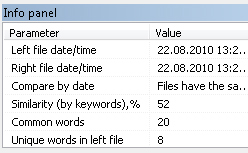
You can obtain useful information about file using Info panel:
Further analysis
For analysis of non-related documents (for documents that don't have a common ancestor), please read about comparison by keywords.