
Text comparison utilities suggest several methods or types of comparison. Once you have downloaded some tool, you might want to find out what comparison types do this very utility supports and if you really need this comparison method. In this article we've reviewed most popular comparison types and put our comments on what is the appropriate comparison type for various people and jobs.
Comparison for specific job or industry
| Job | Comparison type | When use |
| Software engineer or web-master | By Characters | When need to find changes in the word and highlights changed characters. |
| By Words | When comparing documents that have common ancestor. | |
| Legal, health care, education, finance professionals | By Words | When doing detailed comparison of documents that have common ancestor. |
| By Keywords | When need to find common idea of two texts, when need to find the focus of each document |
|
Comparison type: by characters |
|
|
When use: When need to find changes in the word and highlights changed characters |
|
|
Who use: Software engineers and web-masters when reviewing source codes |
|
|
Example: |
|
|
|
|
|
Text1. Modified and deleted characters were highlighted |
Text2. Modified and new characters were highlighted |
|
Added character - Deleted character - Modified character |
|
|
Comparison type: by words |
|
|
When use: When comparing documents that have common ancestor |
|
|
Who use: Software engineers and web-masters when doing rapid review; Legal, health care, education professionals when doing detailed comparison of documents that have common ancestor |
|
|
Example: |
|
|
|
|
|
Text1. Modified and deleted words were highlighted |
Text2. Modified and new words were highlighted |
|
Added words - Deleted words - Modified words |
|
|
Comparison type: by keywords |
|
|
When use: When comparing non-related documents (documents doesn't have common ancestor) |
|
|
Who use: Legal, health care, education, finance professionals when need to find common idea of two texts, when need to find the focus of each document |
|
|
Example: |
|
|
|
|
|
Text1. Common and unique keywords were highlighted |
Text2. Common and unique keywords were highlighted |
|
Unique (new) keywords - Common keywords (appear in both texts) |
|
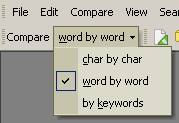 Compare
Suite supports all these comparison types. It allows to compare texts by
characters, by words, and by keywords.
Compare
Suite supports all these comparison types. It allows to compare texts by
characters, by words, and by keywords.
You can run Compare Suite, and select necessary comparison method in drop down menu. More over: you can change the comparison method on-the-fly. You can compare two texts by characters, and then compare the same texts by keywords by changing comparison method.





