Uploading incremental
changes to site or incremental backup - BackupChanges
There are two problems that webmaster or simple user might face every
day. First, it is necessary to backup file, sure you run some backup program
but what about fast incremental backup?
Which will backup only changes that were made today? Second, the problem
which most webmasters face. You do a lot of work with your web-site and you
should upload changes online, you have two options - upload whole site or
upload just changes. That's where webmaster face the problem of finding
and managing of changed files.
We at AKS-Labs.com are have developed the new project called
BackupChanges, the project will help uses with changes and incremental
backup.
The BackupChanges software is automatic software for backup of changed or
new files. The variety of settings allows specifying what files to backup,
where put them and how to run backup quickly every time you need. The
software is great choice for changed files management, in a case there is a
need to backup files, upload changed documents to the web or send changed
files to colleague.
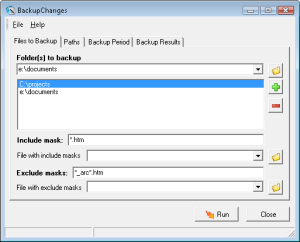
With BackupChanges one can specify files that need to be copied into
archive. Typically, it is enough to specify the source folder and nothing
else. There are also many options to fine-tune the backup, for instance,
user can specify the include and exclude file mask. Resulted files will be
packed into archive, so there is also an option to specify how to keep files
in archive, e.g. using relative path or absolute path.
As the program focuses on changed and new files niche, there is a
possibility to specify the time period for which changed files should be
copied to archive. The easiest way is to use some predefined intervals, for
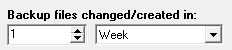
instance for last 3 days. If necessary, the precise date and time interval
can be specified. The predefined choices include minutes, hours, days,
weeks, months, years.
Resulted file archive is a zip file, which can be managed with any popular
archiving software or server-based file manager. The name of resulted file
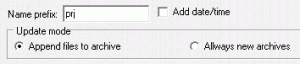
can be generated automatically using the source folder name and date/time
stamp. As for destination directory user have an opportunity to add more
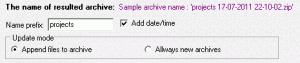
than one record. This is useful, if the changed files should be sent to
flash-drive for emergency backup, to hard drive for long-term backup and a
copy to the desktop, for future uploading online or sending to co-worker.

All these features might sound complicated to use every day, so there is one
extremely useful feature. Once user fine tuned the backup project as needed,
the batch file can be generated. Next time the user will need a backup, he
or she will simply run the batch file. All necessary parameters will be
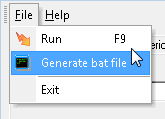
passed to the program automatically. In this way managing new or changed
files is as easy as one click.
What possible applications are there for this program? Who might need this
software?
- The BackupChanges software will find useful anyone who involved in
document management process. For instance, software developers might
exchange some source codes, while powerful CVS system might not be suitable
for project scale, the automated exchange of changed files will
significantly simplify the process.
- Web-masters or web-designers use web authoring software to manage files
off-line. Actually, there are a lot of files, pictures, scripts, pages, and
so on. Most of them are small, but still required to be uploaded to the
web-server. With BackupChanges the upload process is much easier, as
uploading one big archive and then unpacking it online is less time
consuming than uploading smaller files.
Finally, there is a possibility of data loss. Sure, today hard drives are
much more reliable, but most data losses occurs due to user's action, e.g.
making some wrong changes to file, accidently deletion of the files and so
on. With BackupChanges dropping a copy of work project to the flash drive is
really easy. Incremental Backup – Backup Changed Files Made Easier
When you deal with a lot of file modifications every single
day, there comes a need to do incremental backup. Its features make backing
up important files way easier.
It is but normal for companies to process a lot of files in a single
workday. These may be files that contain mundane information about the
companies’ operations and such. Or, these may contain very important and
classified information about the clients of the companies themselves. Such
would be the case of an accounting firm, for the files contained in its very
own database and network would bear sensitive information about the clients
that it represents. The files may contain the clients’ social security
information, credit card details, and more. Imagine how devastating it would
be to lose all of this information, whether intentional or unintentional.
Thus, there is a need for companies to perform data backups. And for
companies that deal with a lot of files and information in a single workday,
there is a need to do incremental backup – backup changed files, in laymen’s
terms.
There are indeed a lot of methods to conduct data backups. However, when it
comes to choosing which particular method to go for, this would depend on
the needs, as well as the operations, of the company. Your choices include
full backup, mirror backup, differential backup, and incremental backup.
When numerous files are dealt with, incremental backup is the ideal choice.
But why not the other methods? What sets apart incremental backup then? Here
is a rundown on the other methods that to not make great choices here.
First off, a full backup is recommended when only a small number of files
need to be backed up in a single workday. Backing up just a few files will
not consume that much time at all, so conducting a full backup will not be
too difficult. Two tapes are needed here so that you can use them
alternately. This way, if one of the tapes turns out to be defective, then
you would have the other tape to turn to. The mirror backup is conducted the
way you would the full backup. The only difference here is that the files
are not compressed anymore when you do the mirror backup. Also, you won’t be
able to protect the backup files with a password because this feature is no
longer offered.
The differential backup, on the other hand, is better for companies that
deal with a lot of data. This is actually a supplementary method to the full
backup. What happens here is that a full backup is conducted preferably on a
Friday night, and the differential backup is then made on another weeknight.
This way, only the files that have been modified are saved through the
differential backup. However, the archive attribute is not reset to its
original state. This means that when you conduct your next backup, all the
files that have been modified since the last full backup will be saved all
over again. This means double the time and the hassle, and the backup size
will become larger and larger until your perform another full backup.
This makes incremental backup more efficient. The archive attribute here is
reset to its original state so you won’t have to save file changes over and
over again. Thus, only the modified files since that last full backup or
incremental backup are saved. Incremental backup – backup changed files –
indeed the ideal choice, especially when you’re dealing with a huge amount
of files every single day at the office. How to Upload to Web-site Changed Files
It is important to upload to web-site changed files, to garner
quality site traffic. There are easy ways of doing this as well.
Maintaining a web-site is hard work. The success of a web-site does not come
from merely its successful launch. This is because for a web-site to garner
a lot of profit from its customers, constant updates have to be made. Now,
being the webmaster, you might think to yourself that it is very easy to
constantly update your web-site with new material. Yes, this may be easy
during the first few weeks, and even months, since its successful launch.
However, you never know when you might find the concept of maintaining it
quite burdensome on your part already. Perhaps you might be busy with other
things, or you just might lose your interest on your web-site. Nevertheless,
the fact still remains that it is important to update your web-site
regularly and vigilantly. Here then are some easy methods for you to upload
to web-site changed files that you have updated over time.
A very effective method that you can try is to use a publishing program.
There are a lot of publishing programs that you can try in the market today.
Yet, the important thing to remember here is to go for the program that has
features that suit your needs best. For your own convenience, you might want
to try a program that allows you to connect to your own web-site live. With
this feature, you can then make drafts of the pages you want to modify and
update. Once you are done with the editing, the changed files can then be
published onto the site easily. But if you still need to obtain second
opinions regarding the changes you have made, then you can save these
changes onto a temporary page for the meantime. Once you get approval for
the changes, these can then be published.
Aside from the features of the program, you also have to consult your own
computer skills when it comes to web-site maintenance. Let us face it: not
all computer users come with the same package or set of computer skills.
Some may be savvy enough to use publishing programs that come with very
advanced features for web-site enhancement. Others, however, might be better
off using the most basic of these publishing programs. Yes, these skills can
indeed be learned over time. But you still have to be realistic here, for
you always have to start somewhere, so it would be better to start with the
basics.
Once you do find that appropriate program, the next thing to do is to
develop your very own maintenance schedule. Determine the most convenient
time for you to do these updates and file modifications. More importantly,
you should stick with this maintenance schedule.
So, what kinds of updates are ideal to make? Let us say you have an events
list on your web-site. The events that have already passed should be
deleted, while the new ones should be updated. The recommended schedule for
this kind of file change is actually on a weekly basis. Old news articles
should be deleted or replaced with new ones. Photos, graphics, and images
that grab the attention of your viewers should also be updated regularly.
Once you upload to web-site changed files and more, you just might notice
significant improvement in terms of site traffic already. |