
There are many document compare tools that claim to be the fastest, the most accurate, and the easiest to use. Actually, the speed of comparison is never an issue unless you are designing a high performance system. As for accuracy, any software will highlight all the differences for you, the questions are if it is easy to:
- Read the results of comparison
- Make some conclusions from these results
- Share these results if needed
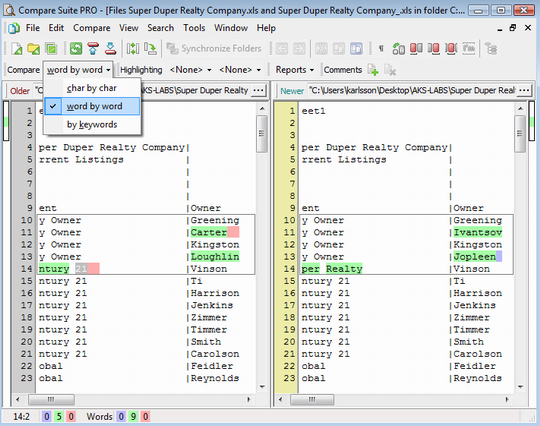
That’s where the real difference between compare tools is.
1. Comparing Excel spreadsheets and CSV documents
Compare Suite can work with MS Excel files (.xls, .xlsx), Comma-separated values data (CSV), as well as with “Calc” format (OpenOffice’s Excel analog). Here are steps to compare two Excel documents (the work with CSV and OpenOffice documents is similar):
1. Run Compare Suite. Select “New file comparison” in “File” menu. If two documents are located on your desktop, then you can simply select them, right click on one of them, and select “Compare with Compare Suite…” command in the context menu.
2. Select file on the left by clicking “…” buttons. Compare Suite will read the document and display all of the spreadsheets that are available in the Workbook. You can choose which spreadsheets you want to compare.
3. If on the previous step you choose just one spreadsheet, then Compare Suite will allow you to choose columns that you’d like to compare.
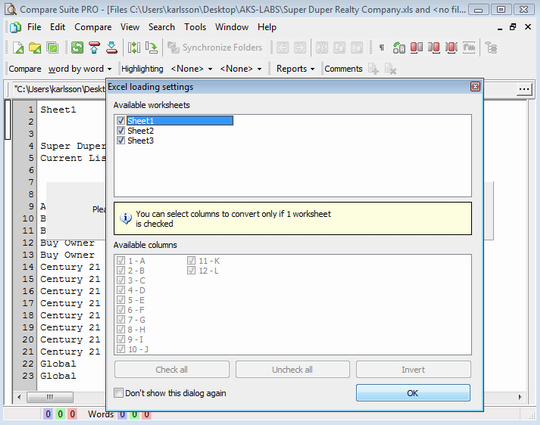
4. Press “OK.”
5. Repeat steps 2-4 and select another document to compare with the first one.
Compare Suite displays the data from an Excel spreadsheet. It won’t look exactly the way it looks in Excel, but don’t worry, all of your data is there.
- As you can see, Compare Suite is flexible and helps you to focus on the information that matters, this is especially useful when your Wordbook is huge.
2. Analyze compared documents
Compare Suite will automatically compare two selected documents and display the results. Here are some tips that will make the analysis of the compared documents more effective:
- Move the mouse cursor over the difference that is highlighted. If the number was changed, the program will display an absolute difference between the numbers and the relative difference in percent as well.
- If the date was changed, the program will calculate and display in the hint the difference in days between the two dates.
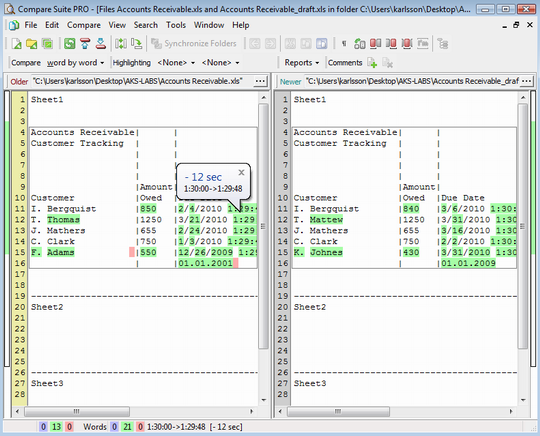
Compare Suite will present some meaningful data for the spreadsheets that have some common ancestor. What if two spreadsheets have nothing in common?
- The program calculates the similarity. If two spreadsheets are too dissimilar (normally it means that they don’t have a common ancestor), then Compare Suite will suggest to switch to “By Keywords” compare mode. In this mode you will be able to learn what new ideas (expressed in new keywords) were added to a spreadsheet.
Sometimes, Excel documents contain some information that you don’t want to take into an account. For example, in the end of the document, there might be a last update time, which obviously would be different for two documents. You can make Compare Suite ignore this line. See Tools > Options > File comparison > Ignoring.
3. Share the results of comparison and analysis
Obviously, you are doing this comparison for some purpose. You might want to track changes that were made to some budget or indicators that you have in Excel. Here are some tips to collaborate on two versions of a spreadsheet effectively:
- The easiest thing you can do is to generate a file compare report (see various options in File -> Report). You can send this report to your colleague mentioning important ideas in email message.
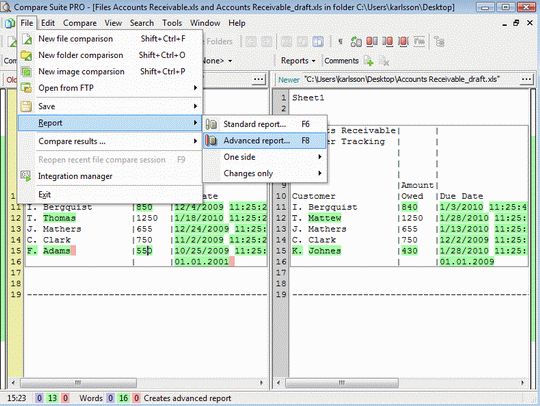
- The previous tip won’t work well if you have some specific comments about some specific changes and these changes are across the whole Excel file. You could write to your colleague something like “See the changes in rows 12, 15, and 18), but it is better to use Compare Suite’s comments functionality. Right click on the appropriate line number in the program and use “New comment” command. Your comments will be visible in Compare Suite, as well as in the reports.
What users say about Excel comparison
It’s always good idea to learn what others say about certain function of the program:
I’ve used Compare Suite for getting detailed information about differences in Excel format. It has made a difference when checking the compatibility of various software databases. Read more…
Shane Smalle, ABB., St Neots., Software Engineer.
The Reports it generates are easy to use and are presented in a clear manner. Our company has expanded the use of Compare Suite to call it via the command line. Read more…
Paul Geraci, Analyst Programmer, Friends First Holdings Ltd, Ireland
OpenOffice Calc
There is a free analogy of MS Excel called OpenOffice, it includes software similar to MS Word (OpenOffice Writer) and to MS Excel (OpenOffice Calc). With Compare Suite one can match spreadsheets from MS Excel and OpenOffice Calc.
Advanced users
Advanced users will find the command line interface useful. Compare Suite can compare Excel files via this interface as well. This might be useful for ongoing quality control of some documents.
Have you compared some Excel spreadsheets? What is your impression from Compare Suite? Please, share in the comments.



















 Compare documents to find differences regardless of the format:
 Use the
  Archive comparison:
  Compare


 Compare files
 UNICODE is fully supported: open and compare documents in any language or encoding.
 Create a fully customizable

Hi, Nice Article. Thanks for Sharing This Steps to Compare Excel Files. I Think Synkronizer Also a Better Option to Compare Multiple Excel Files.