
Compare Suite was not designed with software engineers or testers in mind, but it appeared that most of the features that office users like, are recognized by software professionals as well. We had no option, but to add even more features that have made Compare Suite a good choice for any software development team.
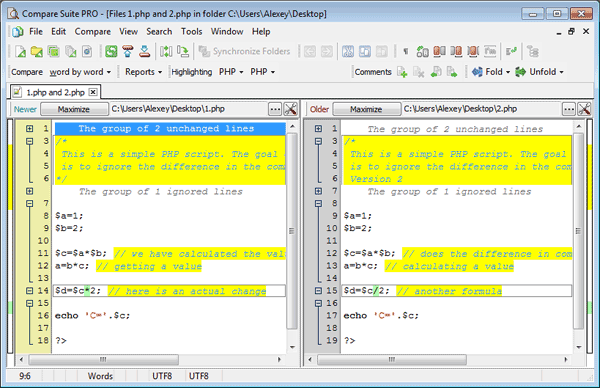
Two .php source files are compared in Compare Suite. Line and block comments (marked with yellow) are ignored.
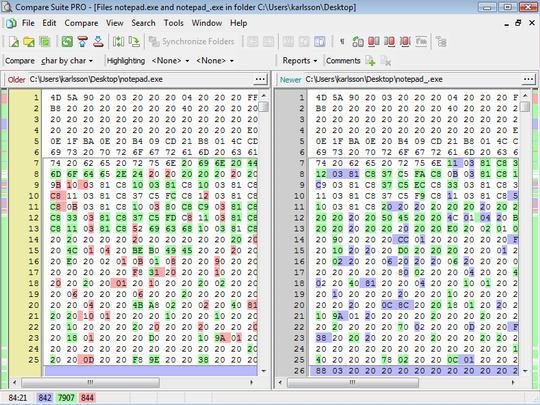
Compare Suite supports binary formats like .exe or .dll
Here is what Compare Suite offers:
- Ability to compare source codes
- Ability to compare binary files (.dll and .exe)
- Syntax highlighting for the most popular source code formats (C++, .pas, .java, …)
- Ability to ignore the comments during a comparison (the program recognizes one-line comments as well as block comments)
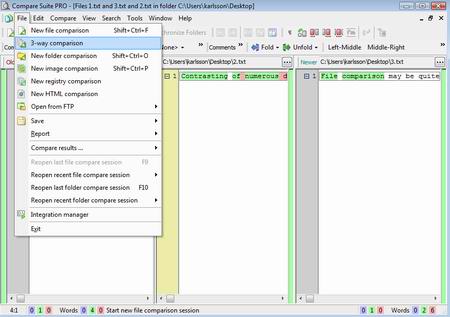
- 3-way comparison allows one to compare 3 versions at once
- Command line support for an automation purposes
Let’s review the features that might be interesting for software engineers and testers.
Supported Formats
Syntax highlighting is available for the following formats and extensions:
- ObjectPascal (pas, pp, dpr, dpk, inc)
- HTML (htm, html)
- C+ (c, cpp, cc, h, hp, cxx, hxx, cu)
- CSharp (cs)
- CascadngStyleShet (css)
- JavaScript (js)
- XML (xml, xsd, xsl, xslt, dtd)
- MS-Dos Batc (bat, cmd)
- PHP (php, php3, phtml, inc)
- Assembly (asm)
- SQL (sql)
- VisualBasic (bas, vb)
- MS-VBScript (vbs)
What if a file extension that you work with is not on the list? Go to the Tools > Options > File Comparison > Syntax Highlighting. There you will find the list of used highlighters, and you can add your extension to the most similar highlighter that already exists there.
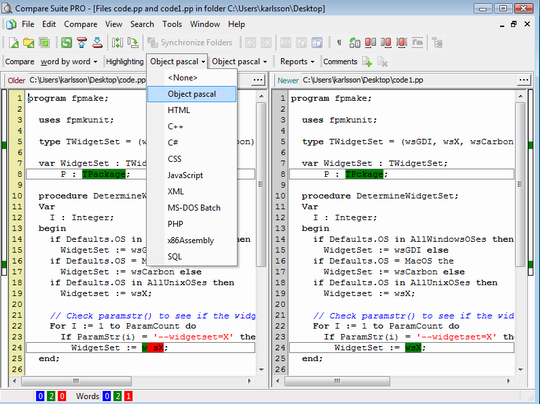
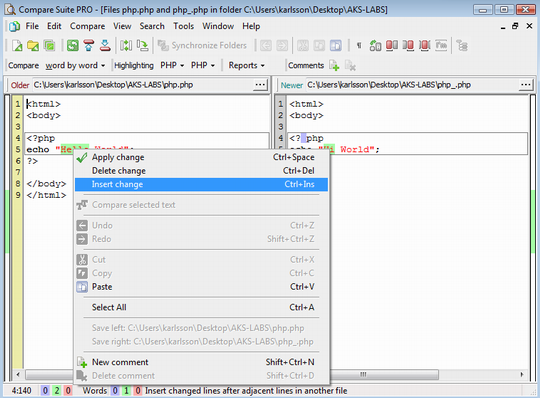
Once a comparison is started, you can also change the highlighter that was applied automatically to the file. For example, if inside you PHP there an insertion of HTML, then you might want to switch to an HTML highlighter temporarily.
Command Line Execution
One of the most important things for a software developer is to be able to execute the program via the command line. Normally, it takes time to learn and test all command line parameters. To help with this process, Compare Suite has an “Integration manager” that makes it easy to build command line parameters. Learn more…

- For sure, the command line interface and integration manager make an integration with 3rd party tools much easier.
If you are planning to use Compare Suite in your automated test script, then you will find this case study useful.
Wise archive management
A typical situation is when something started working wrong in the code and you want to compare the current version with the previous one. You can get a previous version from your versions control system or you probably have it in your local backup.
- Compare Suite can open your .rar or .zip archive, so that you don’t need to unpack it before. Read more…
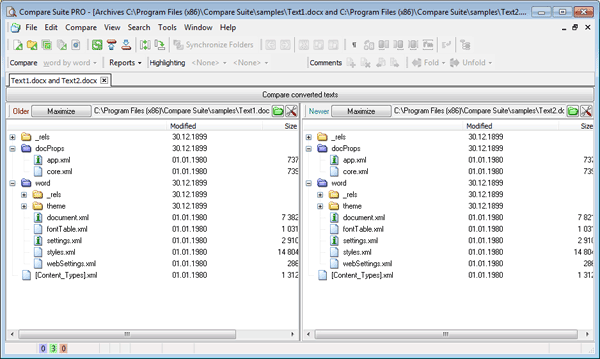
Another useful tip about archives: those who work with the newest version of MS Word know that .docx and .xlsx files are actually archives that keep inside separate data about the formatting and the content. Try sending two Word files for the comparison and you’ll see that Compare Suite suggests to you several comparison options, including opening Word files as archives.
XML comparison
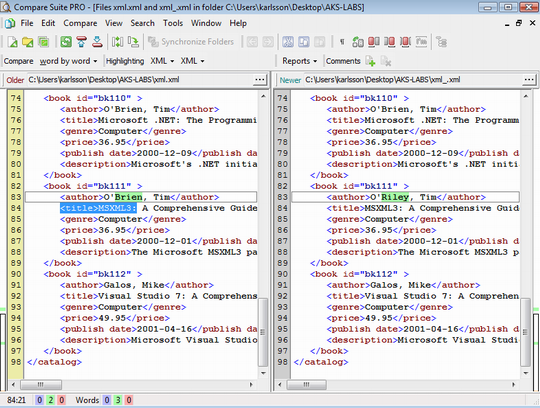
Among the formats mentioned above is XML. Together with XML syntax highlighting and Compare Suite folder that allows folding/unfolding changes, the review of two XML files is really pleasant.
HTML Comparison
Few words about HTML comparison:
- Compare Suite can actually compare webpage files as a code (needed for any webmaster) and
- as a page as it is seen in a browser.
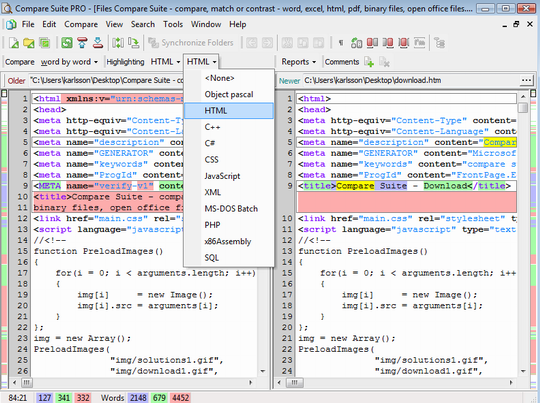
Software developers mostly use code comparison, but it’s good to know that you can also switch to the browser version of the document.
Compare Link
Compare Suite supports .lnk and .url files as well. It can open the link content and follow it. For example, if you point Compare Suite to .lnk file that is linked to an application, then Compare Suite will go directly to the comparison of that application. The same applied to the .url files and web pages.
COM Server
Compare Suite can work as a COM server for the purpose of comparison as well. For more details check out COM folder in Compare Suite installation. You will find there COM server application, as well as examples client applications.
Software Developers About Compare Suite
Here what our users say about Compare Suite.
We use your product to compare a library of program distributive with reference archive copy of the same programs after each antivirus scan. Read more…
Yury Stepanov, IT Director, Itfin, Russia, Moscow
We are using the features of Comparing Folders, Ignore Line option (not ignore by keywords), XML Comparing (XML is not Sorted but Compare Suite sorts it before comparing) and using command line calls. The file formats are PDF, XML, Text & CSV. Read more…
Paul Geraci, Analyst Programmer, Friends First Holdings Ltd, Ireland
We use it for comparing different documents with previous versions to ensure the documents are repopulating each week. This is one of our quality assurance measures. Read more…
Nykole Masters, Information Quality Analyst, AHS, Calgary, AB, Canada
I have used the Compare Suite program to perform User Acceptance testing of data transfer utilities. The product is very easy to use but has a wide range of functionality. I particularly like the reporting options and formats. Read more…
Anthony Frend, Scientific Support Analyst, Huntingdon Life Sciences, Alconbury, UK
The comparison of files used in automated processes vs. the manually created files in order to validate the automation process. Read more…
Frank Duffy, Integration and Data Warehouse Manager, CommVault Systems, Inc., NJ, USA
Compare Suite is used to compare different versions of code files (.sql) that are usually outside the version control system. Moreover, it is used to compare flat .txt files that are used for communicating data between the bank and other organizations. Read more…
Theodore Bosinakis, Database developer, Greece.
Are you software engineer or tester? We are interested in hearing your experience with the product. Please, feel free to share in the comments.



















 Compare documents to find differences regardless of the format:
 Use the
  Archive comparison:
  Compare


 Compare files
 UNICODE is fully supported: open and compare documents in any language or encoding.
 Create a fully customizable

Leave a Reply
You must be logged in to post a comment.