
Imagine a typical situation. An employee sends to his supervising manager a new version of the document for the review. Fortunately, the manager has Compare Suite installed and the analysis of the modifications will be much easier:
- The manager opens two files, and in a few seconds Compare Suite shows the results.
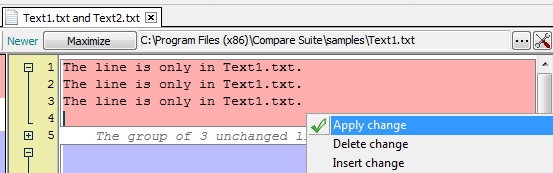
What’s next? The manager needs to review these changes one by one and decide which ones can be approved, and which ones need to be reworked. Also, when we talk about a large document, the manager or auditor needs to have a means to effectively navigate through the document. Some of those changes and manager’s comments about them need to be communicated to the employee that is responsible for the editing of this draft.
Compare Suite supports this process and provides the necessary functionality:
- Ability to approve/decline changes
- Easy navigation through the changes
- Ability to write comments
- Bookmarks of important lines
- Folding/unfolding of text blocks
- Various reports in HTML and Word formats
Let’s have a look at those features and how they help business professionals.
Approve or decline changes
All modifications between documents are highlighted with colors in Compare Suite. Right click on any difference marked in this way. The first 3 commands in the context menu are:
- Apply change
- Insert change
- Delete change
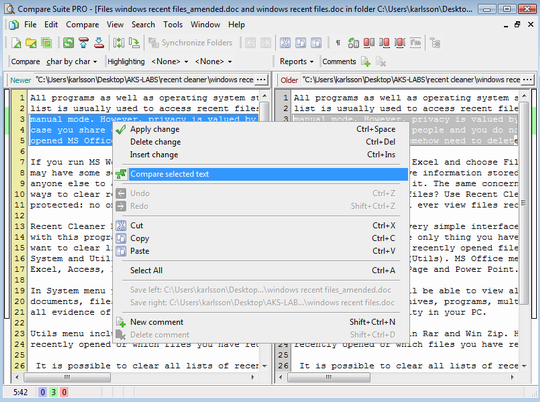
Choose one of the options to apply an appropriate action.
Important note: Compare Suite won’t save your changes to some formats like PowerPoint presentation or MS Excel Spreadsheet. A document with approved changes can be saved in plain text format only.
Here is what our users say about the auditing feature:
The auditor who uses the software absolutely loves it. He has reported a net savings of at least 2 hours on one report alone. Read more…
Jeff Mortenson, PWL Technology, Biloxi, MS. IT Manager.
The program definitely makes comparing PDF documents easier. The colour coding of the added, modified, or removed lines makes comparing multiple document quick and painless. Read more…
Nykole Masters, Information Quality Analyst, AHS, Calgary, AB, Canada
We use Compare Suite to compare versions or upgrades of my reports, to identify corrections, errors, etc. in the document made by my colleagues. Read more…
Bedrich Weber, Researcher, Slovak University of Technology, Bratislava, Slovakia
This product allows me to undertake a high level review of system files that I change on a frequent basis. Read more…
J Livingstone, L. Energy, Melbourne. Development Co-ordinator.
Commenting on changes
Let’s say that some modifications are not that easy to approve/decline. The manager sees that there is some problem that needs to be fixed. In this case he or she can use the commenting feature. To create a new comment:
- Right-click on the changes
- Select “New comment” in the context menu
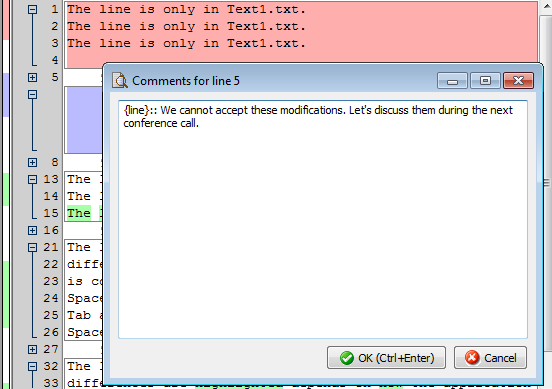
The line numbers for those lines that have a comment are marked with a rectangle. If you are going to generate a compare report, don’t worry, your comments will be there!
Once you have several comments you can navigate between them using “Previous comment” and “Next comment” buttons on the toolbar.
Folding/unfolding changes
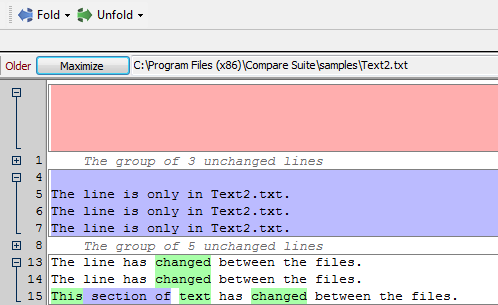
For your convenience blocks of unchanged lines can be folded into a group. Along the number line you’ll see [+] symbol that hides unchanged lines. Click on it if you need to review those lines; click on [-] symbol to fold this block again.
Navigating between changes
There are two navigation buttons on the toolbar:
- Go to the next difference
- Go to the previous difference
These help you to navigate through the document in a more time effective manner. In this way you can be sure that you will notice all of the differences, even the smallest ones.
Using bookmarks
Let’s assume that we are talking about a 40 page contract document that the senior legal specialist reviews. Imagine that some modifications need to be discussed during a Skype call. Obviously, nobody has time to browse through all those changes during the call. Instead, this legal specialist can mark the important sections with bookmarks.
To add a bookmark:
- Right click on the necessary part of the text, and
- Select “toggle bookmarks” command
When you need to use a bookmark, right click again and choose “Go to the bookmarks” option in the context menu. It’s really a good time saver for the further discussion of the modifications within the document. It can be used together with the comments.
Moving panels
There are two panels in Compare Suite where you can open files for the comparison. Normally the file on the left is the older one and the file on the right is the newer one.
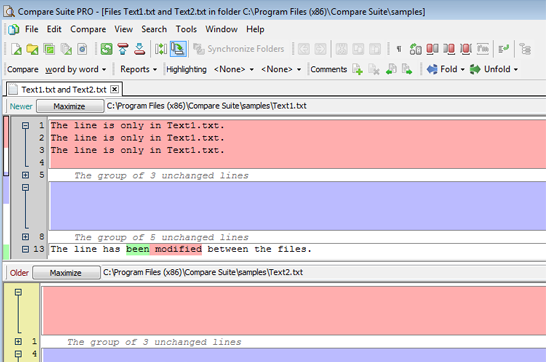
But you can change this according to your needs:
- Use “Switch panels” button on the toolbar to put the left panel on the right and the right one on the left;
- Use the “Rotate panels” button to display one panel above another one.
Reports
Finally, let’s talk about the reports that Compare Suite can create automatically taking into account the original document, found changes, and your comments. Go to the File > Report menu to review all of the available options.
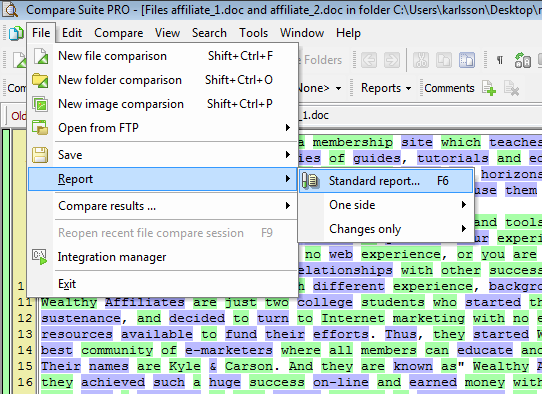
The report options will be different for folders and files. Here are some tips that will help you to select an appropriate report type:
- Select the level of the details that you need to have – Advanced Report is the most detailed report, it will contain not only information about changes, but the full source texts of the documents. Changes Only Reports as their name implies will include only the changed lines.
- Select the resulting format of the report, it can be a Word or HTML document.
- You have an option to generate a report for two sides (as you see it in Compare Suite) or report for one side only where all of the modifications will be marked.
Our users about the reporting feature:
The product is very easy to use, but has a wide range of functionality. I particularly like the reporting options and formats. Read more…
Anthony Frend, Scientific Support Analyst, Huntingdon Life Sciences, Alconbury, UK
It is a good help for me when I need to arrange or classify the differences between files during my work. I find especially great the possibility of making one report out of the changes for two files. Read more…
Sergei Romaniuk, 81 years-old pensioner
Regardless if you are a developer, Business Analyst or Business user Compare Suite has an intuitive interface. The Reports it generates are easy to use and are presented in a clear manner. Read more…
Paul Geraci, Analyst Programmer, Friends First Holdings Ltd, Ireland
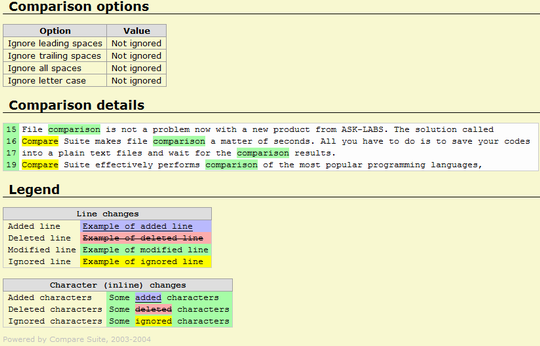
It might sound like reports are for business professionals only, but they will be useful for quality assurance engineers as well. For example, when running automation tests like in this case that we discussed before.
Ignored lines
Certain lines can be ignored in Compare Suite. It means that the program won’t take them into account when searching for the differences. Those ignored lines will be marked in the report and in the interface of Compare Suite with yellow color.
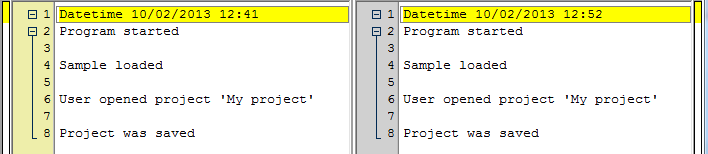
This feature is adjustable in application’s options and is useful when two documents include some repeating pattern that you want to ignore. For example, the “Last modified” stamp in the bottom of the page. Read more about lines ignoring…
Saving compare session
For larger documents or folders (where comparison takes more time) you might want not just to generate a report, but also to save the results of a comparison with all of your comments, bookmarks, and approved changes.
Compare Suite provides this opportunity as well. Go to the “Compare results…” command in “File” menu. From that menu you can save the current comparison results and open previously saved results of the comparison.
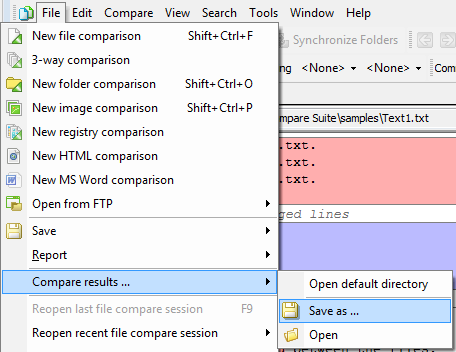
You might need to open an old comparison to add some more comments or to avoid the waiting time when large files are compared.
How do you prefer to use Compare Suite? Have you tried commenting and reports? Please, share your opinion in the comments.



















 Compare documents to find differences regardless of the format:
 Use the
  Archive comparison:
  Compare


 Compare files
 UNICODE is fully supported: open and compare documents in any language or encoding.
 Create a fully customizable

Leave a Reply
You must be logged in to post a comment.